Notes and tasks, finally on the same page.
Every other GTD tool makes you pick one or the other, then tacks the second on as an afterthought. Mind Like Water was built to hold both from day one — equal partners, linked together.
Try it free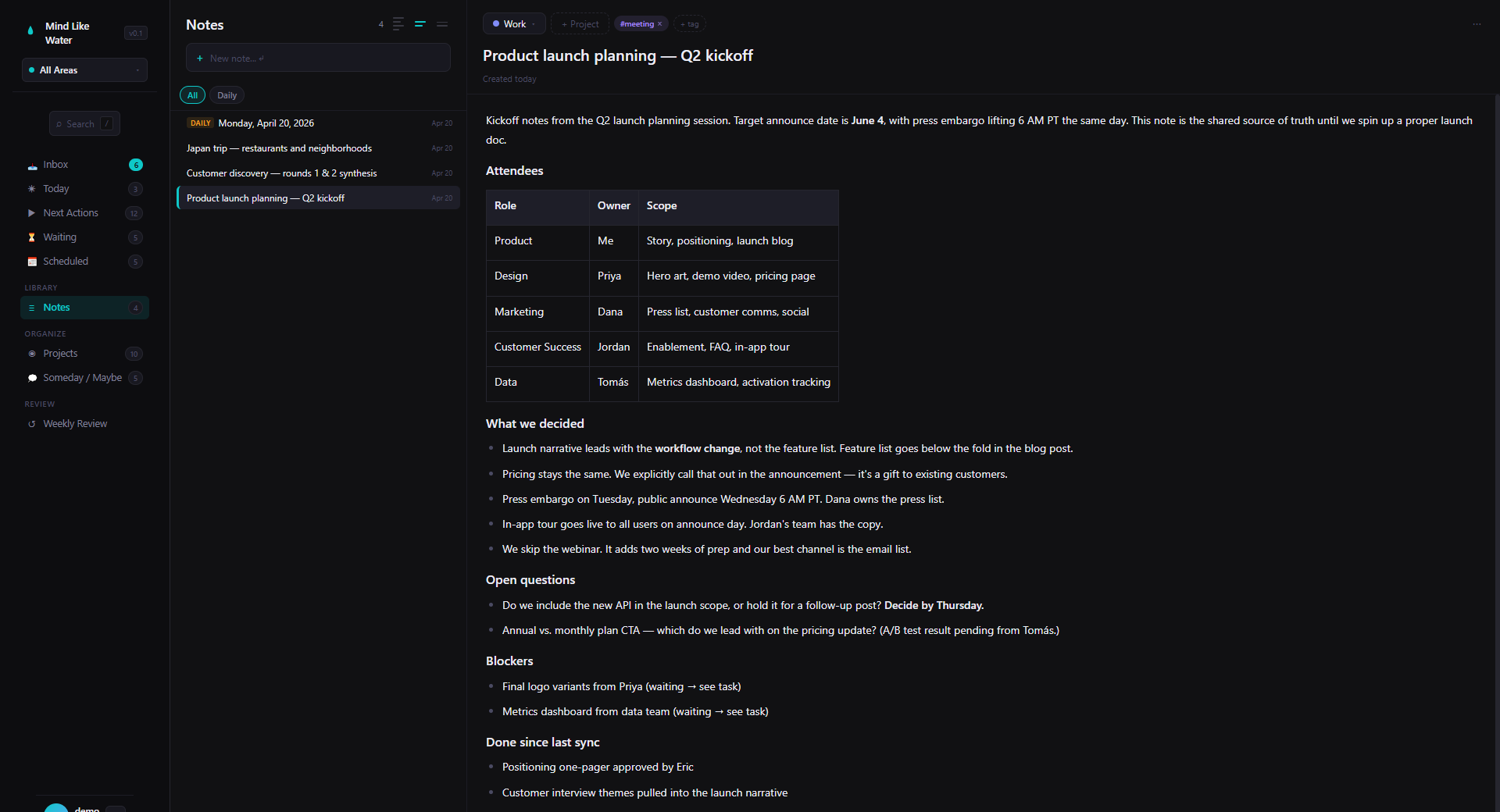
Type /task. Get a real task.
In any note — meeting note, project plan, daily page — type /task buy paint and press Enter. A real task appears, both as a row in your task list and as a clickable chip right there in the note. The chip has a circle. Click it to mark the task done. The completion shows up everywhere your tasks live: Today, Next Actions, Inbox, the project page.
The point: a task you created in a note isn't a different kind of task. It's the same task, viewed from a different surface.
The mental model: a task is one thing. You can see it in a list, you can see it in a note, you can complete it from either. Same task, two surfaces.
Why this matters
The reason every GTD attempt eventually breaks is the gap between where you think and where you act. You take meeting notes in one app. You manage your task list in another. The action items from the meeting either get retyped (a tax that adds up) or get forgotten (worse).
Mind Like Water collapses that gap. The note is a real writing surface — paragraphs, headings, tables, images, anything you want. And it's also a place where real tasks can live, with a real connection back to the rest of your system. The kitchen-remodel note has the action items inline, and those action items are the same items you see in Today.
What "real task" means here
A task chip in a note isn't a markdown checkbox. It's a real task with all the same fields any other task has:
- Status — inbox, active, waiting, scheduled, someday, done. The same statuses as any task.
- Area & project — automatically inherited from the note (so a task you create in a Personal-area kitchen-reno note lands in Personal under Kitchen Reno without you doing anything). Smart-syntax in the title overrides if you want to put it elsewhere.
- Due date, start date, energy, star, context, tags — settable from the task's detail pane like any task.
- Recurrence — open the task in the detail pane and set a recurrence rule. Same recurring-task engine as the rest of the app.
Click the chip's title to open the task in the detail pane. Click the chip's circle to complete it. It's a task with a writing-surface handle attached.
Two kinds of checkboxes — and why we kept both
Some things in a note really are just note-internal checkboxes. A grocery list. A packing list. Items you tick off as you go and never see again. Forcing those to be "real tasks" would flood your inbox with thirty grocery items every Saturday — wrong outcome.
So we kept the regular markdown checkbox: typing [ ] at the start of a line, or using the /checklist slash command, makes a note-internal checkbox that doesn't appear anywhere outside the note. The square shape signals "this lives here only." The circle on a /task chip signals "this is a real task that lives in your system." Two visual indicators, two intents, no ambiguity.
One-line rule: circle = real task, lives everywhere. Square = note-internal checkbox, lives here only. The first time you make one, the app reminds you which is which.
Sync, both directions
Both the note chip and the task list look at the same task. Complete the task in Today and reload the note — the chip is checked. Complete the chip in the note — the task is done in Today. Edit the task's title in the detail pane — the chip's label updates everywhere it appears.
The chip stores a pointer to the task, not a snapshot of it. There's nothing to drift; you're always looking at the live task.
What's also in a note
The chip is one piece of a real writing surface. Notes in Mind Like Water also support:
- Headings, lists, blockquotes, code blocks, tables — the usual rich-text palette, fully editable inline
- Images — drag-and-drop, paste a screenshot, or use the
/imagecommand - @mentions for people, tasks, and projects — type
@and pick (or create) a person tag, an existing task to link, or a project to reference - #tags — type
#for non-person tags; the picker offers existing tags or lets you create new ones inline - [[Wikilinks]] between notes, with backlinks rendered automatically on the linked-to note
- Slash command for everything —
/task,/checklist,/heading,/image,/table, and more
Frequently asked
It's a real task. The /task command creates the task and inserts a chip in the note that points at it. The same task shows up in Inbox, Today, Next Actions, and on the project page — exactly as if you'd created it from any of those views.
/task and /checklist?/task creates a real task in your task system. /checklist creates a note-internal checklist — square checkboxes that live only in this note and don't show up in your task views. Use /task for things that matter beyond the note; use /checklist for ad-hoc lists like packing or groceries.
Yes. Both surfaces look at the same underlying task, so completing it anywhere updates everywhere. Open the note again and the chip's already checked.
The chip goes away, but the underlying task stays alive. You unlinked it from the note; you didn't delete it. To delete the task, open it from Inbox or Today and use the task's own delete action.
Yes — the daily page is a note. Type /task on today's page and the task gets a chip there too, plus a place in your task views. It's a great way to plan the day in writing and have the to-dos already in the system.
Stop hopping between apps.
14 days free, no credit card. Try writing a meeting note with the action items already real.
Start free trial Free for 14 days. Pro is $8/month after.