A page that's actually for today.
A rich-text writing surface attached to each date. Morning intention, meeting notes, end-of-day reflection. Journal meets planner meets scratch pad — one place that's always today's.
Try it free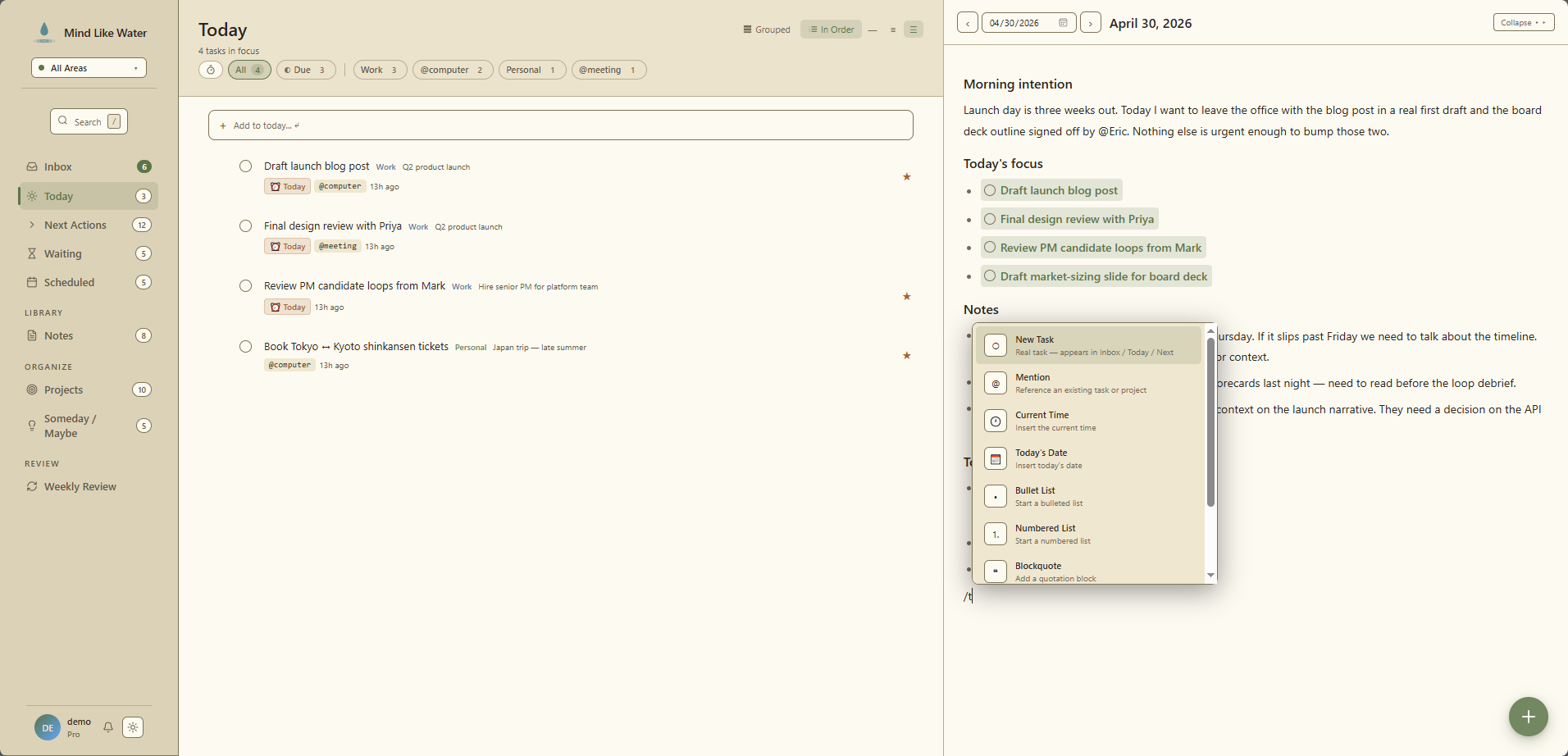
What it's for
- Morning intention. What's the one thing that matters today?
- Meeting notes. Jot during calls, turn commitments into tasks after.
- Reflection. What happened, what you noticed, what you learned.
- Capture overflow. If a quick note isn't worth a full reference page, put it here.
Press f to open today's page from anywhere in the app.
How it's different from a regular note
Both are writing surfaces with the full editor — headings, tables, images, checklists, slash commands, mentions, wikilinks. The difference is the key:
- Cloud notes are keyed by user-picked title. Permanent reference. "Q2 launch plan." "Kitchen remodel running plan."
- Daily pages are keyed by date. Date-stamped journal. "Tuesday, May 5" — every date has at most one.
You write reference content into a cloud note. You write today's thinking into the daily page. Both link to each other, both link to tasks and projects.
The mental model: daily pages are journal. Cloud notes are reference. Both are notes; they just have different anchors.
Tasks live inline
Type /task draft launch blog post on the daily page and a real task appears — a clickable chip with a checkable circle. The task lives in your task system (Today, Next Actions, Inbox, project page) and in this daily page, with both surfaces always in sync.
Plan the day in writing, with the day's to-dos already in the system. End of day, reload — the chips for the things you did are checked. The journal becomes a record of what actually happened.
For ad-hoc to-dos that should live only on this date — a packing list, an errand sweep — use /checklist instead. Square checkbox, note-internal, never appears in your task views.
Voice memos land here
When you press Shift+N for voice capture, the AI splits what you said:
- Discrete tasks ("Email Jane about the contract") go through the review-and-save flow.
- Reflective content ("I'm thinking about how to structure the Q3 OKRs") gets appended directly to today's daily page.
That keeps your reference library tidy and gives you one obvious place to find the morning ramble you recorded on the way to work.
The weekly review reads your daily pages
Commitments you wrote down but never turned into tasks tend to die there. "Call Linda Thursday" buried in a Wednesday journal entry. The AI Weekly Review scans your recent daily pages, pulls out those commitments, and surfaces them with an "Add as Next" button.
It's the safety net for the daily-page risk: capturing too freely and forgetting some of it became actionable.
Tips
- Don't force it. Empty daily pages are fine. Some days you just don't have anything to write.
- Commitments belong as tasks. If you catch yourself writing "call Linda Thursday" in a daily page, capture it as a real task — either with
/taskinline or by exiting the editor and pressingn. Daily pages shouldn't hold actions by themselves; the system should. - Use it as a planner. A "Today's focus" heading with three to-dos beats a flat task list every time. Writing the goal in prose grounds the day.
Frequently asked
A daily page is keyed by date, not by title. It's date-stamped journal content, where a regular note is permanent reference. Same writing surface, same @mentions, same wikilinks — but you can't rename a daily page, and one exists per date you've used.
When you voice-capture, the AI splits the transcript into discrete tasks (which go through the review-and-save flow) and reflective content (which gets appended directly to today's daily page). So your morning ramble becomes the day's journal, your concrete to-dos become tasks.
Yes. The weekly review reads your recent daily pages and pulls out commitments you wrote down but never turned into tasks. "Call Linda Thursday" buried in a Wednesday journal entry shows up in the review with an Add as Next button.
Yes — type /task on the daily page and a real task appears as a clickable chip. It's the same task that lives in your task views; checking it on the daily page completes it everywhere. For ad-hoc to-do lists you don't want as real tasks, use /checklist instead.
Plan the day in writing.
14 days free, no credit card. Try writing your morning intention in a real surface that's already attached to today.
Start free trial Free for 14 days. Pro is $8/month after.