One inbox. Tasks and notes.
Capture anything — a task in the moment, a note from a meeting, a thought you'll figure out later. It all lands in one place. Triage feels like a single pass instead of two separate apps.
Try it free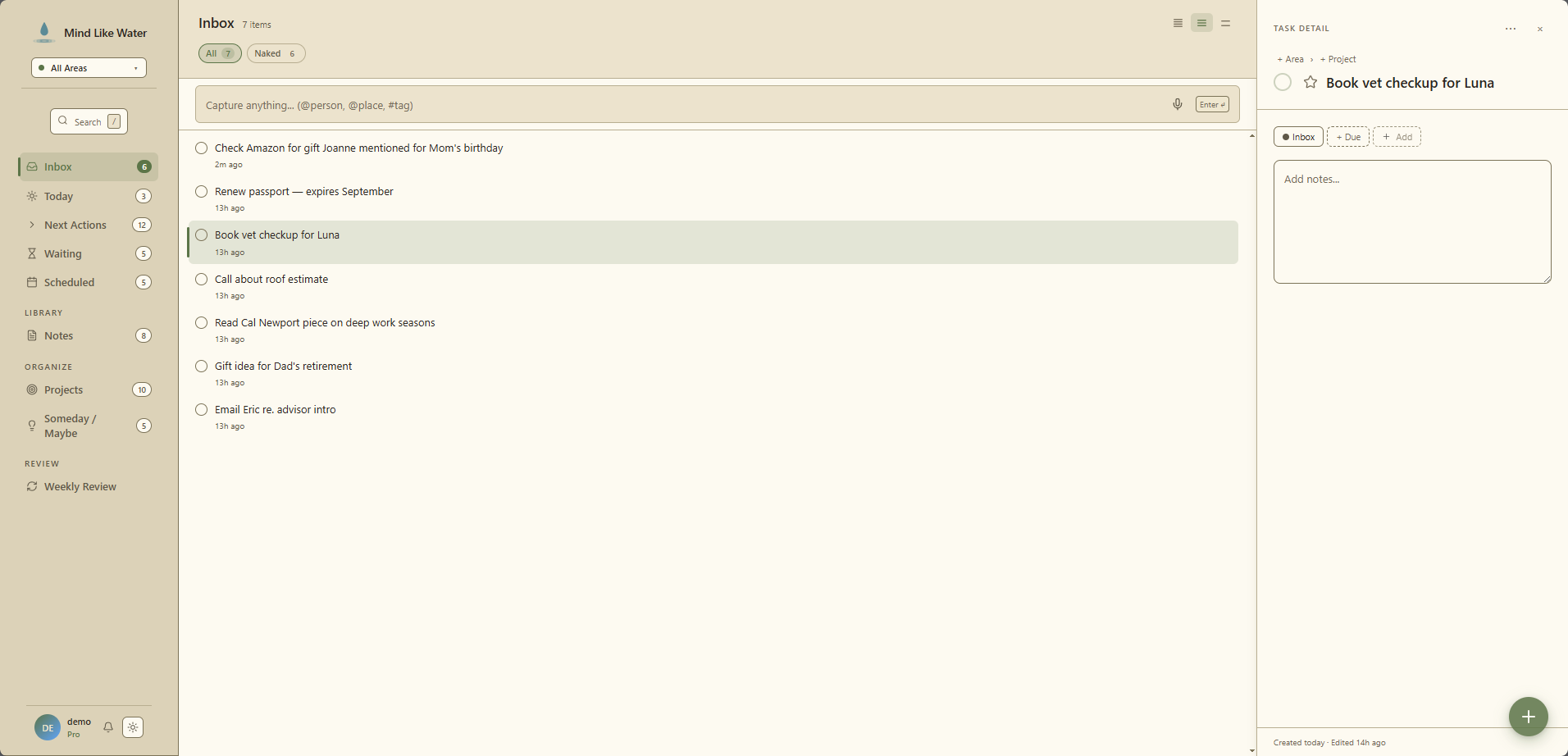
The holding pen between "I had a thought" and "this is part of my system"
Most GTD tools have an inbox for tasks and a separate "untriaged notes" pile somewhere else. Mind Like Water collapses them. Anything you haven't classified yet — task, note, voice memo's saved transcript, an email you forwarded in — sits in one Inbox waiting for a triage decision.
The reason is simple: at the moment of capture, you usually don't know which one it is. You had a thought. Make a decision later, when you can think about it.
How triage actually flows
Press i to jump to Inbox. The view has the same chip rail as the rest of the app — All / Due / Area chips / a duration filter — so you can narrow by what you have time for ("I've got 15 minutes between meetings, what can I clear?").
Tasks and notes render as distinct row types. Tasks have a checkbox + tags. Notes have an outline icon + a first-line preview. You always know which kind you're triaging.
Four moves cover ~95% of triage:
- Assign to a project (
,p) — opens the breadcrumb picker. Auto-promotes the task frominboxtoactiveand you're done. - Mark as someday (
,s) — leaves your active list, lands in Someday/Maybe. - Complete it directly (
c) — for the two-minute-rule items that are faster done than triaged. - Delete it — for captures that turned out to be noise. Confirms before destroying.
For notes, the move is "give it an Area or a Project" — that auto-files it out of inbox. Or hit "Move to Notes" to file it without classifying.
The always-visible capture bar
At the top of the Inbox view there's an input that's always focusable. Type, Enter, save, the input stays focused for the next capture. Faster than Quick Capture (n) when all you want is a title.
Inline syntax works: #tag, @person, @place. Same parser as the Quick Capture title field, minus the chip-related parts. If your fingers are already typing, this is the fastest capture path in the app.
The mental model: Inbox is the one place captures land regardless of type. The triage decision is what classifies them out.
Inbox is universal
Every other view in the app honors the Areas filter — pick "Personal" and Today, Next Actions, Projects, Notes all narrow to Personal. Inbox is the exception. It always shows everything.
The reason: if Inbox were Areas-filtered, captures would feel like they vanished until you switched scopes back. The first thing you do with an Inbox item is decide which Area it belongs to, and that decision is what assigns it. So Inbox is the universal capture spot — every other view honors the scope you've picked.
Where Inbox items come from
- Quick Capture (
n) — anything you didn't tab through to set a project lands here - Voice capture (
Shift+N) — extracted task candidates that you saved to Inbox - Email capture — emails sent to your private capture address
- The always-visible capture bar at the top of the Inbox view
- Mobile share-target — sharing text or a URL to Mind Like Water from another app, on a PWA-installed device
If you find yourself looking at an Inbox item and don't remember capturing it, the row's relative timestamp ("2h ago," "3d ago") tells you when.
What this doesn't do (and why)
- No bulk triage. You can't multi-select Inbox items and assign them all to a project in one shot. The triage step is the discipline; automating it defeats the purpose. We make per-item triage as fast as we can instead.
- No auto-classify. The AI doesn't try to guess where Inbox items belong. AI capture proposes metadata you accept with a tap — it doesn't move things out of Inbox without you.
- No Inbox quotas or shaming. We don't nag you about the count. If it's piling up, the weekly review will surface that.
Frequently asked
Because most people don't naturally think "this is a task" or "this is a note" at the moment of capture — they just had a thought. One inbox lets you triage by intent later. Tasks and notes render as separate row types so the difference is still clear.
Press i to jump there, then arrow through items. On a task: c completes, ,p assigns to a project (auto-promotes from inbox to active), ,s changes status to Someday. On a note: open it and assign an Area or Project, which auto-files it out of inbox.
On purpose. The triage step is the discipline GTD asks for — making each item get a real second of thought is the whole point. Multi-select-and-assign would defeat that. We use the always-focused inbox capture bar and one-key triage shortcuts to make the per-item flow as fast as we can.
Quick Capture (n), Voice capture (Shift+N), Email capture (your private capture address), the always-visible capture bar at the top of the Inbox view, and the mobile share-target if you've installed the PWA.
Stop juggling separate inboxes.
14 days free, no credit card. One place for everything you captured. Triage when you're ready.
Start free trial Free for 14 days. Pro is $8/month after.