What's actually for today.
Tasks due today, starred items, and your daily journal — side by side, in one place. Sized for a single morning's attention. Press f from anywhere.
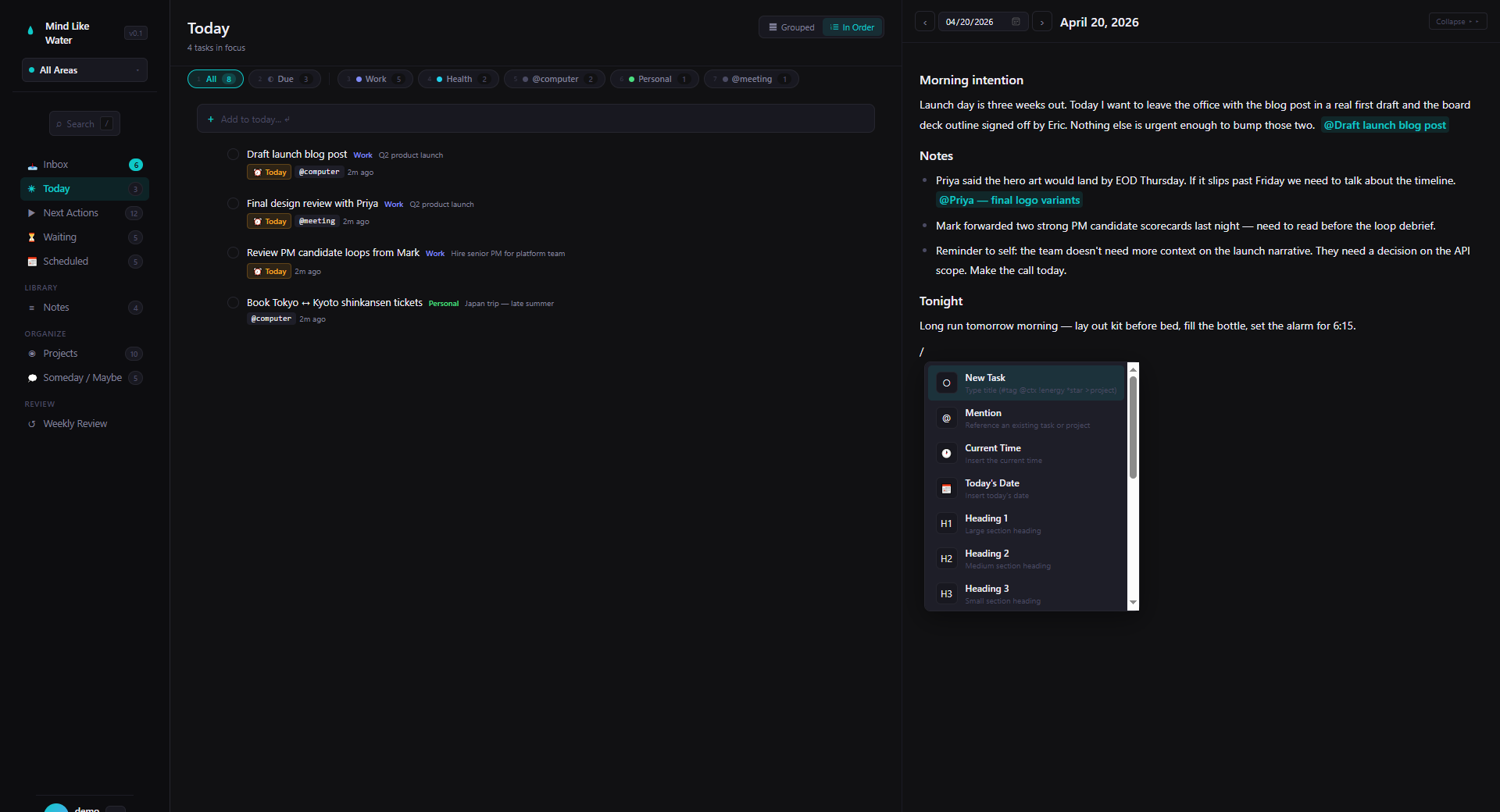
The split-pane layout
Today is a two-pane view: tasks on one side, the daily journal page on the other. You see both at once. No tab-switching, no app-switching, no losing your place when you need to jot something down mid-list.
On mobile the split collapses; tap to swap which one's visible. The desktop split is the hero, though — it's the one place in the app where the "notes and tasks together" thesis lands as a single screen.
Three live sections, plus today's completions
Today's tasks pane is grouped into named sections, in the order you'd actually want to look at them:
- Overdue (red) — anything with a due date before today. The first thing your eye goes to, by design.
- Due Today (amber) — anything with a hard deadline today.
- In Focus (teal) — tasks you've starred. The list of "things I'm engaging with today even though they don't have a hard deadline."
- Completed Today — collapses to a count by default, expand to see what you closed out today.
Filter chips at the top of the view narrow further: All, Area chips, and a duration filter ("I've got 15 minutes — what fits?"). Same chip rail as the rest of the app — your muscle memory for filters works here.
How start dates land on Today
Tasks with a start_date in the future stay tucked away in Scheduled. When the start_date arrives — i.e. the day comes — a morning routine promotes the task by starring it and clearing the start_date. That puts it in the In Focus section.
So the path is: schedule a task to start next Tuesday → on Tuesday morning, it shows up starred in Today's In Focus group. No more "the task said start today and I never noticed."
You can also star manually any time — press v on a selected task — to add it to In Focus directly. And due dates work independently: a due date today lands in Due Today regardless of starred state.
The mental model: due dates are deadlines (Due Today / Overdue). Stars are intentions (In Focus). Tasks become starred either because you starred them or because their start_date arrived — both ways express "I'm working on this today."
The daily journal pane
The right pane is today's daily page — a real writing surface. Morning intention at the top. Meeting notes throughout the day. End-of-day reflection. Anything you'd write in a paper journal goes here, with full rich-text formatting and the same slash-command + mention model as any other note.
Type /task on the daily page and a real task appears as a clickable chip — both in the journal and in your task list. Plan in writing, with the to-dos already in the system.
The mental model: the tasks pane is your engagement list. The journal pane is the running narrative of what's happening. Both for today, both at once.
Sized for one morning's attention
Today is intentionally not "everything that could be done." Long task lists kill engagement — the bigger the list, the lower the chance you'll actually start. So Today filters hard. Due, starred, started — that's it. If a task isn't one of those, it's not for today.
For a wider view, jump to Next Actions (x) — every active task across the system. Today is the morning view; Next Actions is the rest of the day's options.
Frequently asked
Today is filtered to what's actually for today — due, started, or starred. Next Actions is the broader list of every active task. Use Today for engagement and morning planning; use Next Actions when you've got time and need to pick what's next.
Three paths. Star it (press v on a selected task, or * at capture time) — it shows up in In Focus. Give it a due date of today — it shows up in Due Today. Set its start date to today or earlier — when the morning routine runs, it gets starred automatically and lands in In Focus from there.
They mean different things. start_date is the soft "begin working on this" date — when the start_date arrives, the morning routine stars the task so it lands in Today's In Focus section. due_date is the actual deadline — it lands the task in Due Today (or Overdue if it's slipped). Most tasks only need one of the two.
Yes. The split is collapsible from a toggle in the header. Hide the journal when you want a wider task list; restore it when you're ready to write.
Plan the day. Live the day. One screen.
14 days free, no credit card. Open Today, write your morning intention, get to work.
Start free trial Free for 14 days. Pro is $8/month after.